←
Back to Games
PUBG Mobile
Select a product to purchase
Select Denomination
i
Description
🛒 How to Order PUBG UC?
Follow these simple steps to complete your order-
Visit our website: https://www.gamerztopup.com.Select your preferred PUBG UC package. Enter your correct PUBG Player ID (UID). Add the product to your cart or click Buy Now. Complete your payment using bKash or Nagad. Confirm your order and wait for delivery.
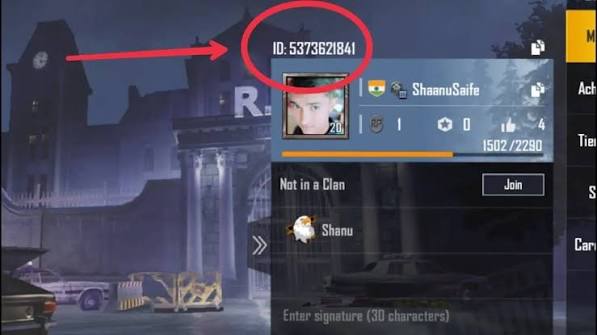
🔍 How to Find Your PUBG Player ID (UID)?
Finding your PUBG UID is very easy! Open PUBG Mobile on your device. Go to the game lobby. Tap your Profile Avatar in the top-left corner. Your Player ID (UID) will appear under your in-game name. Copy your UID and paste it into the Player ID field when ordering.
Gamerz Topup – Fast, Easy & Reliable PUBG UC Top Up!